OnePlus Watch questions & findings

Hi team

Background

I’ve been looking for a suitable replacement for my TicWatch Pro 5 (in light of Mobvoi winding down WearOS support, and software/battery not holding up).

I have been testing if OnePlus Watch 3 could work.

I’m aware it’s not fully supported by Sleep As Android, but wanted to share some results and findings, and ask if there are any optimisations I’m missing.

Findings

A) Vibration not working

Reported here. Still not working - workaround possible.

This remains an issue when using Bedtime/Sleep mode or DND mode overnight. From what I can tell (with some help from ChatGPT) - these modes are operating as expected and SAA alarm is handled correctly by the OS. However, there seems to be some OnePlus policy to access vibration motor in these modes, where SAA’s vibration is being rejected.

I have built an adequate workaround in Tasker:

  • When SAA sleep tracking starts - enable Theatre Mode + Turn off vibration
  • When SAA alarm starts or sleep tracking stops - disable theatre mode + reenable vibration

Using Theatre Mode (instead of Bedtime mode) may have the added benefit of keeping the watch outside of a deep Doze state.

If some dev/experimental setting could be added to SAA replicating this behaviour, that would be a more robust solution than using Tasker.

B) No SPO2 access

Reported here. Some improvement, still an issue.

Posts indicated this may get resolved with post factum updates from Health Connect.

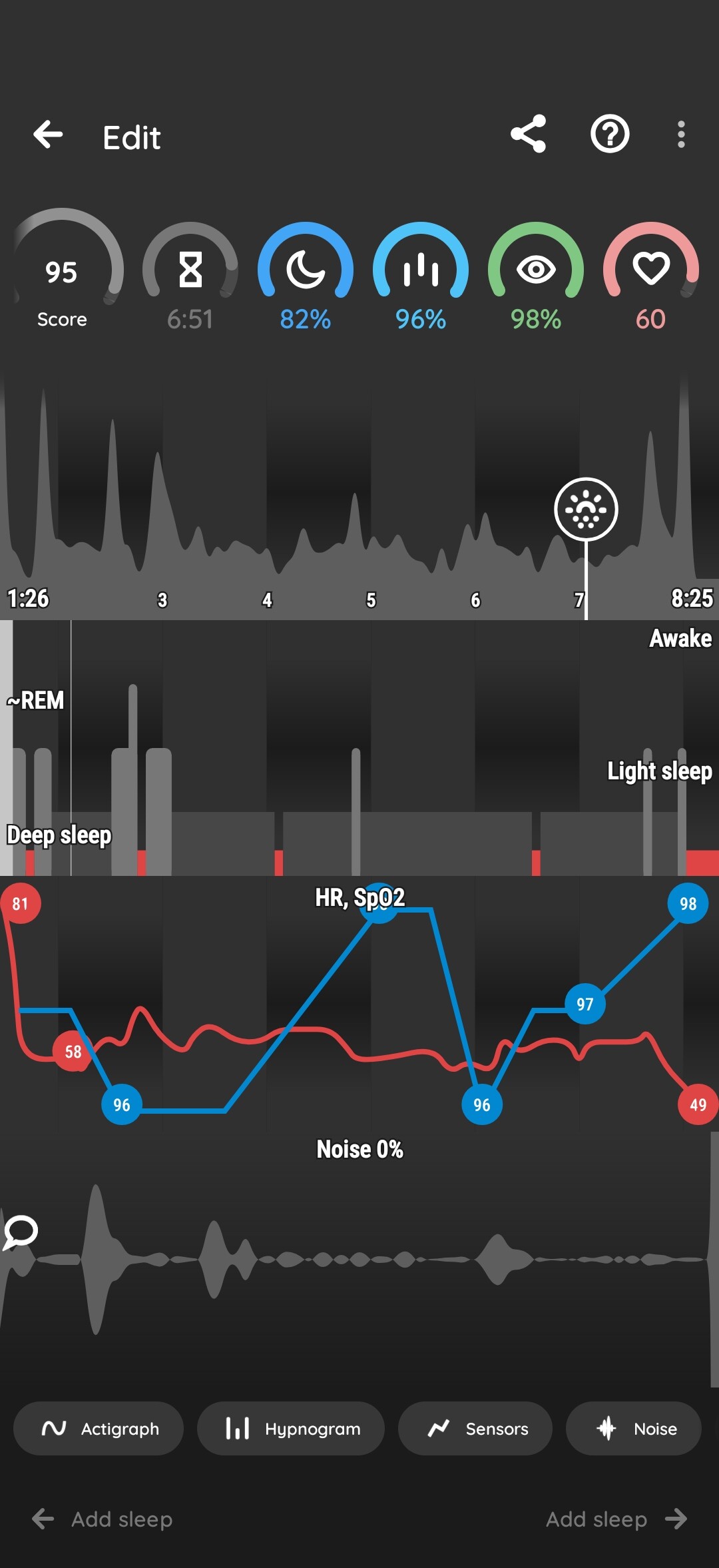
For 19 Feb - Some SPO2 data points have been pulled in, albeit with significant delay (certainly did not appear in first few hours post wake-up). Unfortunately only 5x SPO2 data points are showing - see screenshots below.

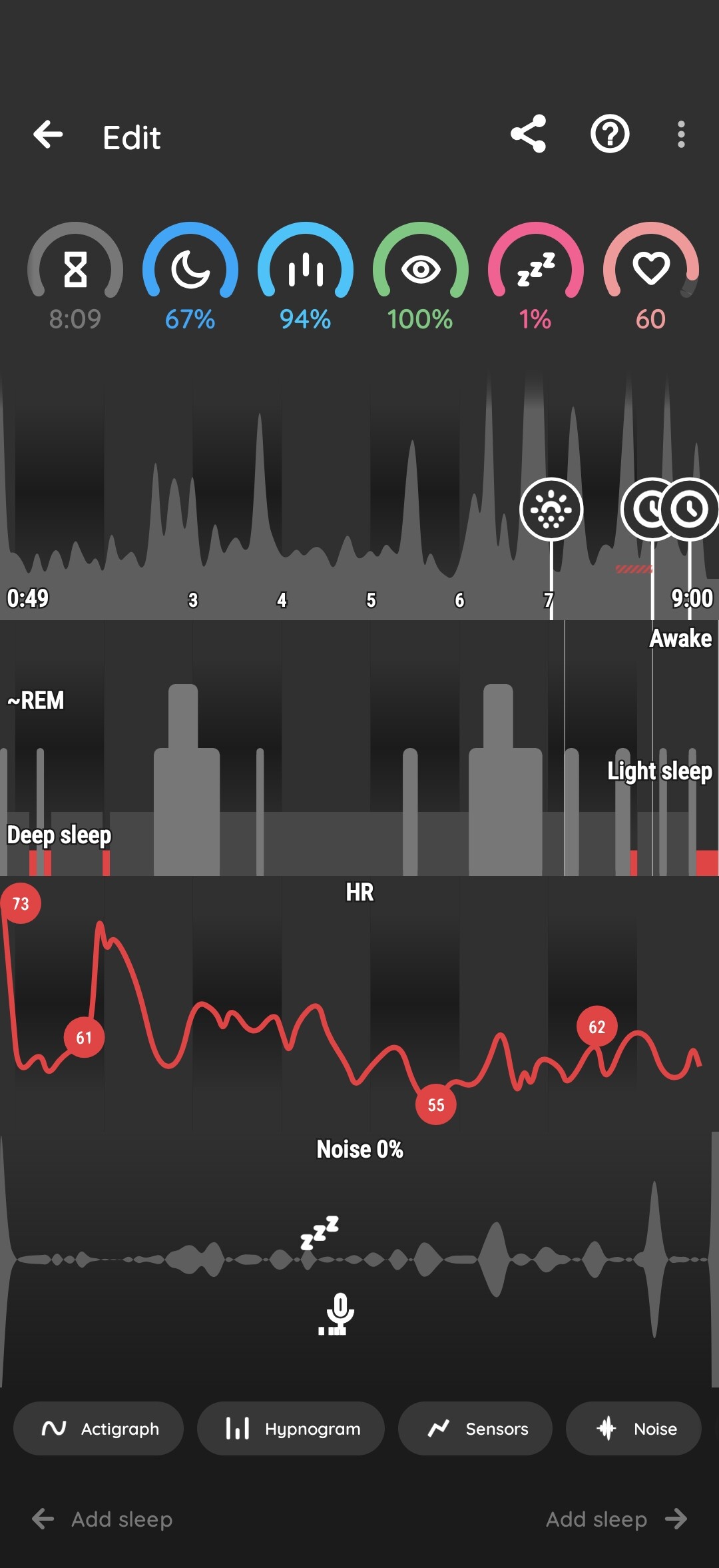
For 20 Feb - SPO2 data night is still not available (2.5 hours after wake-up).

B) Data gaps / red bars

Reported & resolved here. Still an issue.

Posts indicated the red bars issue had been resolved. However I continue to have the problem - see screenshots below. There are not a huge number of gaps.

C) No HRV

Unsure if previously reported.

While HR values are present, HRV is not shown.

D) Inaccurate sleep phase estimation

Unsure if previously reported.

SAA is massively over estimating the amount of deep sleep versus native sleep app. It’s unclear what is causing the discrepancy.

This is a significant problem, as the Smart Wake-up alarm does not work well as a result.

Per Point A above, I have tested using the watch in Theatre mode (rather than Bedtime mode), which I understand helps keep prevent entering a Deep Doze / low power state. I therefore was hoping for more accurate readings, which does not seem to be the case.

Data / screenshots

Phone:

  • OnePlus 15 - Android 16
  • SAA - Version 20260121 (230967) Premium BETA

Watch:

  • OnePlus Watch 3 - Android 14 (WearOs 5)
  • SAA - v5.3.2

19th Feb

20th Feb

Questions / next steps

  • Are you aware of any optimisations or settings that can be applied to improve the above results?
  • In particular Point D - is such a big discrepancy expected with this watch?
  • Other than this - is there any work ongoing to improve OnePlus Watch integration, or is this unlikely to ever be a viable watch for SAA?

Thanks kindly in advance!

1 Like

Hi @vetos,

Thank you for the detailed breakdown of your experience. We appreciate the time you took to document these findings.

While Sleep as Android is fully compatible with all Wear OS wearables, the experience can vary based on specific restrictions implemented by device manufacturers. In the case of OnePlus, several “vendor-specific” limitations affect how our app interacts with the hardware.

Below is a detailed response to the points you raised:

1. Vibration Behavior

We can confirm your finding that Bedtime Mode on OnePlus hardware prevents the app from triggering vibrations. This is a system-level restriction that we cannot bypass from our side.

  • The Workaround: We recommend using the standard Do Not Disturb (DND) mode instead of Bedtime Mode. This allows the app to function as intended.

  • The Fix: This would require OnePlus to provide user settings that allow 3rd-party apps to override vibrations during Bedtime Mode.

2. SpO2 and HRV Data

You are correct regarding the limitations on real-time health metrics.

  • Real-time Access: OnePlus currently blocks non-system apps from accessing SpO2 and HRV data in real-time.

  • The Alternative: This data can only be retrieved via Health Connect. However, the frequency and “granularity” of those data points are determined entirely by Health Connect and what the OnePlus system chooses to sync there.

3. Data Gaps

The gaps you are seeing in your sleep charts are typical symptoms of system optimizations. When the OnePlus system (or the phone’s OS) aggressively kills background processes to save battery, it interrupts the communication between the Wearable app, the Bluetooth service, and Sleep as Android.

4. Sleep Phase Estimation

We don’t have access into OnePlus’s proprietary sleep algorithms. Our estimation methods are based on the raw data we can pull from the sensors.

  • If you’re interested in the science behind our algorithms, you can find our documentation here and here.

We have implemented the full suite of available Wear OS APIs. At this stage, further integration is limited by the “walled garden” approach of the OnePlus ecosystem. Unless OnePlus publishes more open APIs or lifts restrictions on real-time data access, we have reached the current technical ceiling for this specific hardware.

Would you mind sending me a debug log? Based on your screenshots, the dataset appears distorted, suggesting the app might not be receiving a clean stream from the wearable.
Left ≡ Menu → Support (?) → Report a bug

This will allow us to look under the hood and see exactly what the sensors are reporting to us.

Thanks @lenka-urbandroid

I have submitted the bug report so that should be with you now.

I’m not a fan of OnePlus software (for obvious reasons!), but after 3 months with the OnePlus 15 phone have managed to resolve many of the battery optimisation & walled garden issues…. So I’m hopeful I can find some similar workarounds to improving the experience on the watch, starting with sleep phase analysis (SAA is my most important app!).

Otherwise there are very few viable alternatives out there - I’ll probably go back to the Ticwatch or abandon WearOS altogether!